Nextcloud
Nextcloud is installed as an Add-On in Home Assistant. The Data dir is linked to a TerraMaster NAS folder named nextcloud using Samba/SMB.
Running OCC Commands: Not yet setup
- Configure debugging: https://developers.home-assistant.io/docs/operating-system/debugging/
- Remotely Login to HA through SSH
- Run command:
docker exec addon_db21ed7f_nextcloud_ocr sudo -u abc php /app/www/public/occ SOME_COMMAND
Also, crontab is probably located here: /data/config/crontab
Useful Nextcloud OCC Commands: https://docs.nextcloud.com/server/latest/admin_manual/occ_command.html
Nextcloud DB: Using MariaDB Add-On in Home Assistant
Nextcloud config in HA:
Full_Text_Search: false
OCR: false
OCRLANG: eng
PGID: 1000
PUID: 1000
additional_apps: inotify-tools
certfile: fullchain.pem
elasticsearch_server: <ip:port>
enable_thumbnails: true
keyfile: privkey.pem
trusted_domains: >-
  home.freakycowbot.com,home.freakycowbot.com:8099,homeassistant.local,192.168.235.211
use_own_certs: true
default_phone_region: EN
networkdisks: //192.168.100.101/nextcloud
cifsusername: nextcloud_user
cifspassword: **REMOVED**
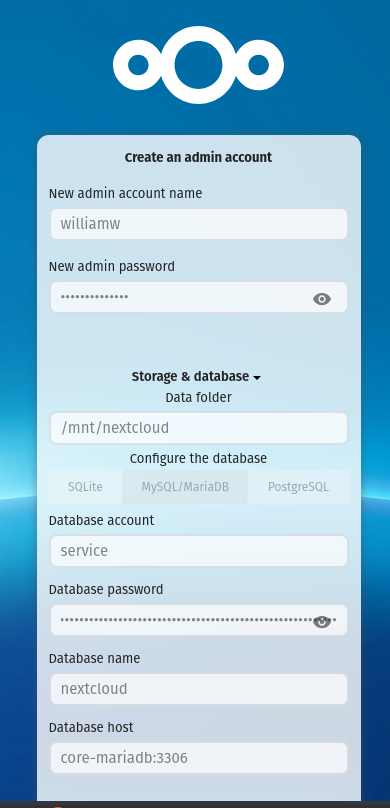
Initial Nextcloud Setup page:
DB credentials originally come from the Nextcloud logs on initial boot.
Using mounted SMB drive for storage (See config above). Not mounted in Home Assistant.