Cleanup Invalid MP3 Files
- Install mp3check
- Probably already available in your distro. Example:
sudo apt install mp3check
- Probably already available in your distro. Example:
- Scan a directory of MP3 files with:
mp3check -erBR3 "SOME_DIR"- This only scans files and reports issues, it does not make any changes
- This is recursive. Remove the lowercase
-rto not dive into subdirectories -Bcauses it to allow variable bitrate files. If your player doesn't support VBR, remove this flag to identify files that are VBR. Note: mp3check cannot convert VBR to CBR, you need tore-encode for that.
- Fix files with command:
mp3check -r3 --cut-junk-start --cut-junk-end "SOME_DIR"- This will write changes to the files stripping out the invalid chunks. The file modified time will be updated
Notes:
- The recursive option does not appear to work properly and only seems to go 1 directory deep
- The Dirname handling seems unusual. You may need to use a /* at the end for it to scan the entire dir
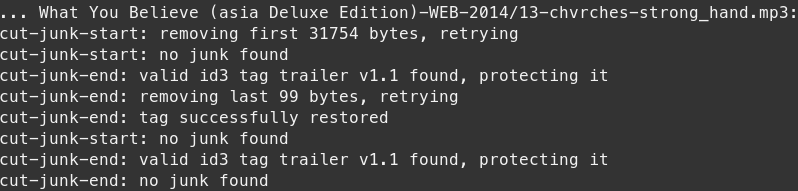
Example cleanup output: